Admin Dashboard Overview
The CoinTrail admin panel is built on Filament 3.x, providing a modern, intuitive interface for managing your cryptocurrency tracking platform.
The admin panel is accessible at yoursite.com/admin. Only users with admin privileges can access this area.
Admin Dashboard - Main overview with key statistics and metrics
Dashboard Widgets
The admin dashboard displays key metrics and statistics through interactive widgets organized in a responsive grid layout:
Stats Overview
The top row displays key platform metrics at a glance:
| Widget | Description | Data Source |
|---|---|---|
| Total Users | Count of all registered users with growth percentage | User::count() |
| Total Revenue | Cumulative payments with monthly growth | PaymentTransaction::completed() |
| Active Subscriptions | Users with active paid subscriptions | UserSubscription::active() |
| Pending Payments | Transactions awaiting processing | PaymentTransaction::pending() |
| Cryptocurrencies | Total coins tracked in database | CryptoMarkets::count() |
| Market Cap | Total market capitalization tracked | CryptoMarkets::sum('market_cap') |
Charts & Analytics
Visual representations of platform performance:
| Chart | Description | Time Filters |
|---|---|---|
| Revenue Chart | Line chart showing revenue trends over time | 7d, 30d, 90d, 12m |
| User Growth Chart | Bar + line chart showing new users and cumulative total | 7d, 30d, 90d, 12m |
| Subscription Distribution | Doughnut chart showing plan distribution | Current snapshot |
API Statistics New
Monitor your platform's API usage and performance:
| Widget | Description | Metrics |
|---|---|---|
| API Stats Overview | Key API metrics at a glance | Total Keys, Daily Calls, Success Rate, Avg Response Time |
| API Usage Chart | Stacked bar chart showing successful vs error requests | 7d, 30d, 90d filters |
| Top API Endpoints | Table of most-used endpoints with performance metrics | Calls, Response Time, Success Rate |
Data Tables
Quick access to recent activity:
| Table | Description | Actions |
|---|---|---|
| Recent Transactions | Latest 10 payment transactions | View details |
| Recent Registrations | Newest user signups with plan info | View/Edit user |
| Top Cryptocurrencies | Top 10 coins by market cap | Price, 24h change |
| Latest Crypto News | Recent news articles | View article |
System Health
Monitor your platform's health status:
- Database Connection - Verify database connectivity
- Crypto Market Data - Check data freshness
- News Feed - Monitor news updates
- Payment Gateways - Active gateway count
- Cache System - Cache functionality status
- Queue System - Failed jobs monitoring
- Update Status - Check for available updates
Dashboard statistics widgets with real-time data
Admin Navigation Structure
The admin panel navigation is organized into logical groups:
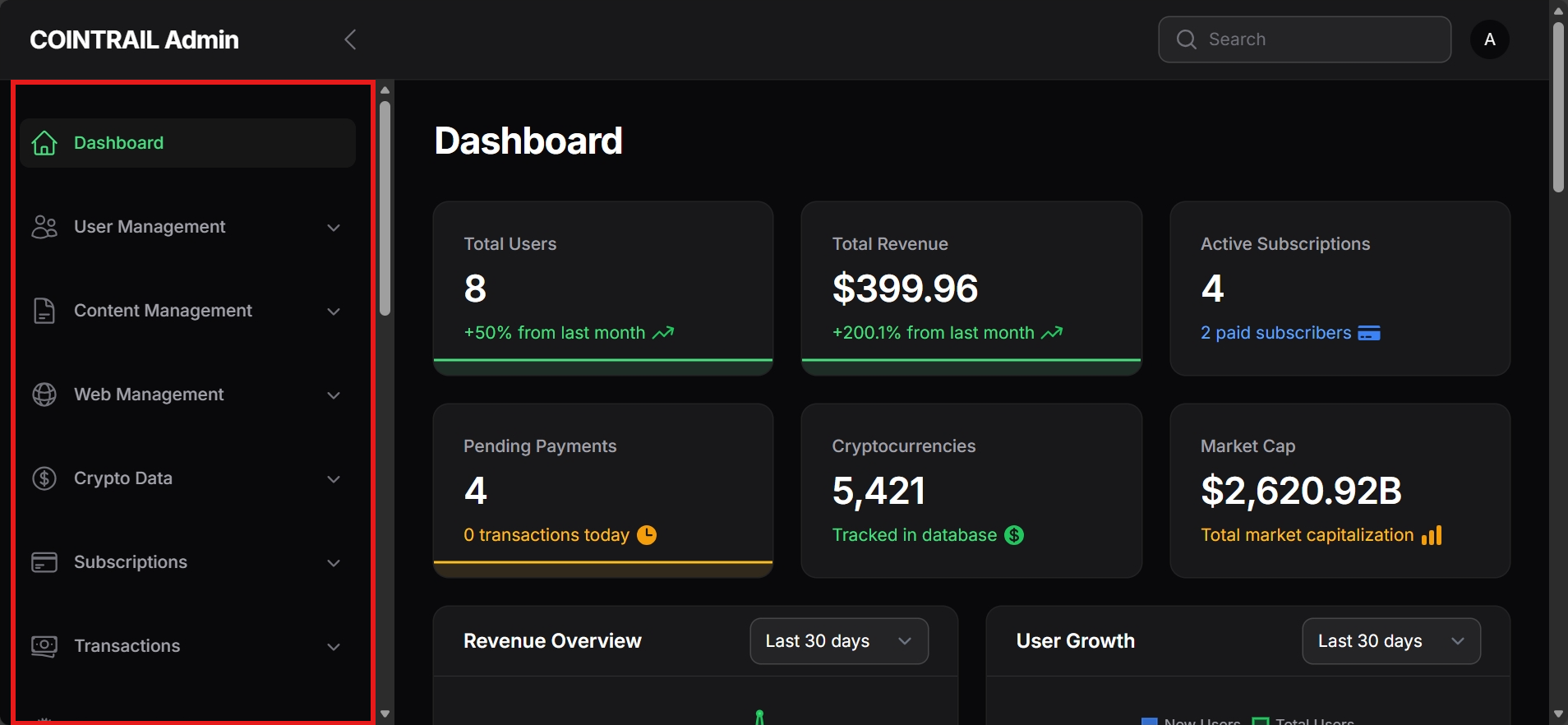
Admin panel sidebar menu showing all navigation groups
User Management
- Users - Manage all registered users, edit profiles, assign roles
- Contact Messages - View and respond to contact form submissions
Subscriptions
- Subscription Plans - Configure Free, Premium, and Pro tiers with features and pricing
- User Subscriptions - View and manage individual user subscriptions
- Subscription FAQ - Manage frequently asked questions for subscription page
Transactions
- Payment Transactions - View all automated payment transactions
- Manual Payments - Approve or reject manual payment submissions
- Payment Logs - Detailed payment gateway logs for debugging
Payment Settings
- Payment Gateways - Configure automated gateways (Stripe, PayPal, Razorpay, crypto payments)
- Manual Gateways - Create custom manual payment methods (bank transfer, mobile money)
Crypto Data
- Exchanges - Manage cryptocurrency exchange listings
- Exchange Volumes - View exchange trading volumes
- Currency Rates - Manage fiat currency exchange rates
- Fear & Greed Index - Track market sentiment data
- Wallets - Manage cryptocurrency wallet information
Content Management
- News - Manage crypto news articles (auto-fetched and manual)
- Blog Posts - Create and publish blog content
- Pages - Manage static pages (About, Privacy, Terms, etc.)
- Events - Manage crypto events calendar
- Categories - Organize content with categories
- Tags - Content tagging system
Web Management
- Crypto Markets - View and manage tracked cryptocurrencies
- Dictionary Terms - Manage crypto glossary/dictionary
- Menu Builder - Configure site navigation menus
- Cron Settings - View and configure scheduled tasks
- API Usage Settings - Configure API rate limits and settings
Communication
- Newsletter - Compose and send newsletters to subscribers
- Subscribers - Manage newsletter subscriber list
API Management New
- API Keys - View and manage user API keys
- API Usage Logs - Monitor API usage and track requests
User Data
- Portfolios - View user portfolio holdings
- Favorites - See user watchlist/favorites
Settings
- Site Settings - Site name, logo, favicon, timezone
- API Settings - CoinGecko API key and plan configuration
- Email Settings - SMTP configuration and email templates
- Feature Settings - Enable/disable platform features
- Appearance Settings - Theme colors and styling
- SEO Settings - Meta tags and SEO configuration
- Social Media Settings - Social links and sharing
- Homepage Settings - Homepage layout and widgets
- Contact Settings - Contact form and support email
- Ad Settings - Advertisement banners configuration
- Third-Party Settings - Analytics, reCAPTCHA, and integrations
- Frontend Settings - Frontend display options
- System Info - View system information and update status
Filament Resources
CoinTrail uses Filament resources to provide CRUD operations. Each resource includes:
Paginated tables with search, filters, and bulk actions. Columns are sortable and exportable.
Validated forms for creating new records with field types matching the data model.
Pre-populated forms for updating existing records with change history tracking.
Resource File Locations
All Filament resources are located in app/Filament/Resources/:
app/Filament/
├── Resources/
│   ├── UserResource.php
│   ├── SubscriptionPlanResource.php
│   ├── PaymentGatewaySettingResource.php
│   ├── CryptoMarketResource.php
│   └── ... (20+ resources)
├── Pages/
│   ├── Dashboard.php
│   └── CronSettings.php
└── Widgets/
    ├── StatsOverviewWidget.php
    └── RevenueChartWidget.php
Admin Roles & Permissions
CoinTrail implements role-based access control using Spatie Laravel Permission:
| Role | Description | Permissions |
|---|---|---|
| Super Admin | Full system access | All permissions |
| Admin | Manage users, content, settings | Most permissions except role management |
| Moderator | Manage content and moderate users | News, FAQ, comments, user moderation |
| Editor | Create and edit content only | News, pages, FAQ creation/editing |
Quick Actions
The dashboard provides quick action buttons for common tasks:
- Sync Prices - Manually trigger a price update from CoinGecko API
- Clear Cache - Clear application, configuration, route, and view caches
- Send Newsletter - Compose and send a newsletter to subscribers
- Export Data - Export users, transactions, or analytics data